🛂
Photo & Image/US Passport Photo Maker

US Passport Photo Maker

AI-powered passport photo compliance — background removal, auto-crop, and 4×6 print sheet — 100% in your browser
AI · 100% LOCAL8 ID types300 DPIPrint sheetAuto background
US passport photo compliance check on a phone screen
AI loading…
⚠️

2026 Update: The U.S. State Department may reject photos with AI-edited backgrounds. Review official guidance before submitting.

1 · Document Type
2 · Background Color
3 · Upload Your Photo
📋 Photo Requirements
✓ White or light background✓ Face forward, neutral expression✓ No glasses or hats✓ Even lighting, no shadows✓ Head centered in frame✓ JPG, PNG, or WebP format
💡 Tip: Stand 3-5 ft from a white wall. Use natural daylight if possible.
📸
Click or drag your photo here
JPG, PNG, or WebP accepted
✓ Compliance Check Ready🔒 100% Private · Local AI
📸

Upload your photo to start

AI face detection · auto-crop · compliance check · 4×6 print sheet

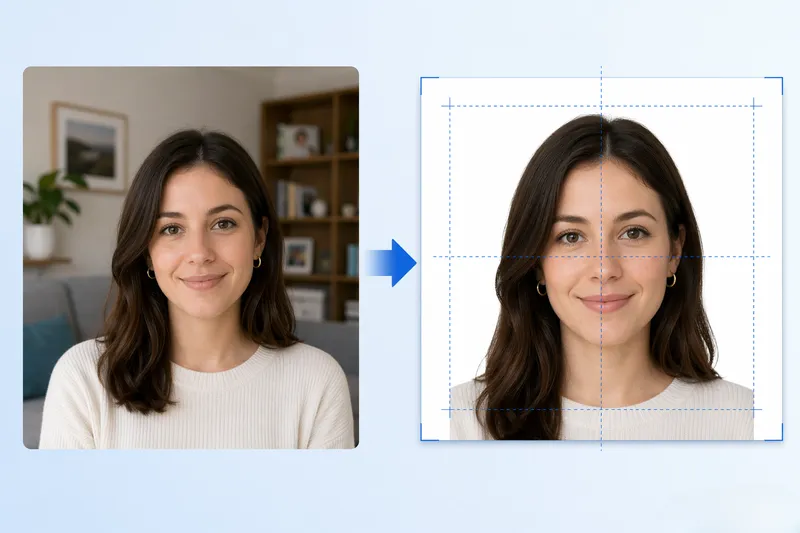
To make a passport photo: upload a front-facing photo, the tool crops to 2×2 inches, removes the background, and generates a 300 DPI print sheet for CVS or Walgreens.

FreeToolHub Passport Photo Maker is a free browser-based tool that creates 2×2 inch US passport photos with AI background removal, no signup, no upload.

Data Source & Legal Disclaimer
Effective: 2026 requirements
Sources: U.S. Department of State — Passport Photo Requirements · BiRefNet-lite — Background Removal · RMBG-1.4 — Background Removal (fallback) · MediaPipe FaceMesh — Face Detection

This tool crops and resizes photos to match published U.S. passport photo guidelines. It does NOT guarantee acceptance — the State Department may reject photos for reasons an automated crop cannot detect (expression, glasses glare, shadows, head covering rules, etc.). Always review your photo against the official checklist before submitting. All processing runs locally in your browser; your photo is never uploaded.

About this tool

What is this tool?

Make a 2×2 inch US passport photo at home. AI crop & background removal, 300 DPI print sheet for CVS/Walgreens. Free, no upload.

8 ID types300 DPIPrint sheetAuto background

What Is the Passport Photo Maker?

The Passport Photo Maker is a free, browser-based tool that creates compliant 2×2 inch (51×51 mm) US passport photos without requiring a trip to a photo studio or drugstore. It uses AI-powered face detection to automatically crop and align your photo to meet US Department of State requirements: head size between 1 inch and 1⅜ inches, centered on a plain white background, with the full face visible and eyes open. The tool removes non-white backgrounds automatically and generates a print-ready 300 DPI sheet — the exact resolution required for official passport applications.

Who Should Use This Tool?

This tool is for anyone applying for or renewing a US passport, visa, or government ID. It is especially useful for families with children (who often struggle to get kids to sit still at a photo studio), people who live far from a CVS/Walgreens, and anyone who wants to save the $15-30 that drugstores charge per passport photo. It is also used by immigration attorneys, travel agents, and expats who need compliant photos quickly.

How Does This Tool Work?

The process takes about 30 seconds: (1) Upload or take a selfie with your phone or webcam. (2) The AI model detects your face, calculates the correct crop area, and checks compliance (head size, eye position, background). (3) The tool automatically removes any non-white background and replaces it with a pure white background. (4) It generates a 4×6 inch print sheet at 300 DPI containing two 2×2 inch photos — ready to print at CVS, Walgreens, Walmart, or any photo printer. (5) Alternatively, export a single 2×2 inch digital file for online passport renewal or visa applications.

What Are the Current US Passport Photo Requirements?

The US Department of State requires: Photo size 2×2 inches (51×51 mm); head size 1 to 1⅜ inches (25-35 mm) from bottom of chin to top of head; plain white or off-white background; taken within the last 6 months; full face, front view, with neutral expression and eyes open; everyday clothing (no uniforms, no hats, no glasses). This tool enforces all of these requirements automatically.

Frequently asked

Is this passport photo tool really free?

Yes, 100% free with no signup, no watermark, and no hidden costs. The AI model runs entirely in your browser. You only pay if you choose to print the photo sheet at a drugstore (CVS charges ~$0.39 for a 4×6 print, compared to $15.99 for their passport photo service).

Can I print the photo at CVS or Walgreens?

Yes. The tool generates a standard 4×6 inch print sheet containing two 2×2 inch passport photos at 300 DPI. Save the image, upload it to CVS Photo, Walgreens Photo, or Walmart Photo online, and select 4×6 inch print. Pick it up in about an hour for ~$0.39. Then cut out the two passport photos.

Does the tool meet US Department of State requirements?

Yes. The tool enforces the 2×2 inch size, 1-1⅜ inch head size, white background, and correct face alignment. However, the State Department also requires the photo to be taken within the last 6 months, with no glasses, no hats, and a neutral expression. Make sure your photo meets these criteria before submitting.

Can I use this for online passport renewal?

Yes. For online passport renewal, you can export a single 2×2 inch digital JPEG file and upload it directly to the State Department website. The file meets the required resolution (at least 600×600 pixels) and format specifications.

Can I make visa photos for other countries?

Yes. The tool supports 8 ID types including US Passport (2×2 inch), US Visa, Schengen Visa (35×45 mm), UK Passport, Canadian Passport (50×70 mm), Indian Passport (2×2 inch), Chinese Visa (33×48 mm), and Japanese Passport (35×45 mm). Select the ID type and the tool adjusts the dimensions automatically.

Is my photo uploaded to a server?

No. The AI model runs 100% in your browser using WebGPU or WASM. Your photo is processed locally and never uploaded to any server. There is no signup, no account, and no data collection. This is a major privacy advantage over online passport photo services.

Joke of the Day
Aug 14

Why did the fish blush?

100% Free, Forever

Keep Tools Free for Everyone

No paywalls, no signups, no data sold. Built by a solo developer who believes useful tools should be accessible to everyone.

Support me on Ko-fi— keep tools free

100% of proceeds go towards hosting & building more free tools.